
Key Takeaways
- AI Sales Acceleration gives each rep three times the preparation and follow-up speed without adding headcount or admin burden.
- Pre-call briefs generated automatically mean your rep walks into every conversation knowing the prospect’s company, their engagement history across your ecosystem, their likely concerns, and the talking points most likely to resonate.
- Post-call follow-up happens automatically: summary emails, next-step confirmations, CRM updates, and internal notifications all fire without the rep typing a word after hanging up.
- Call transcription and analysis reveal what your best reps do differently from your average reps, turning individual performance into teachable patterns that elevate the entire team.
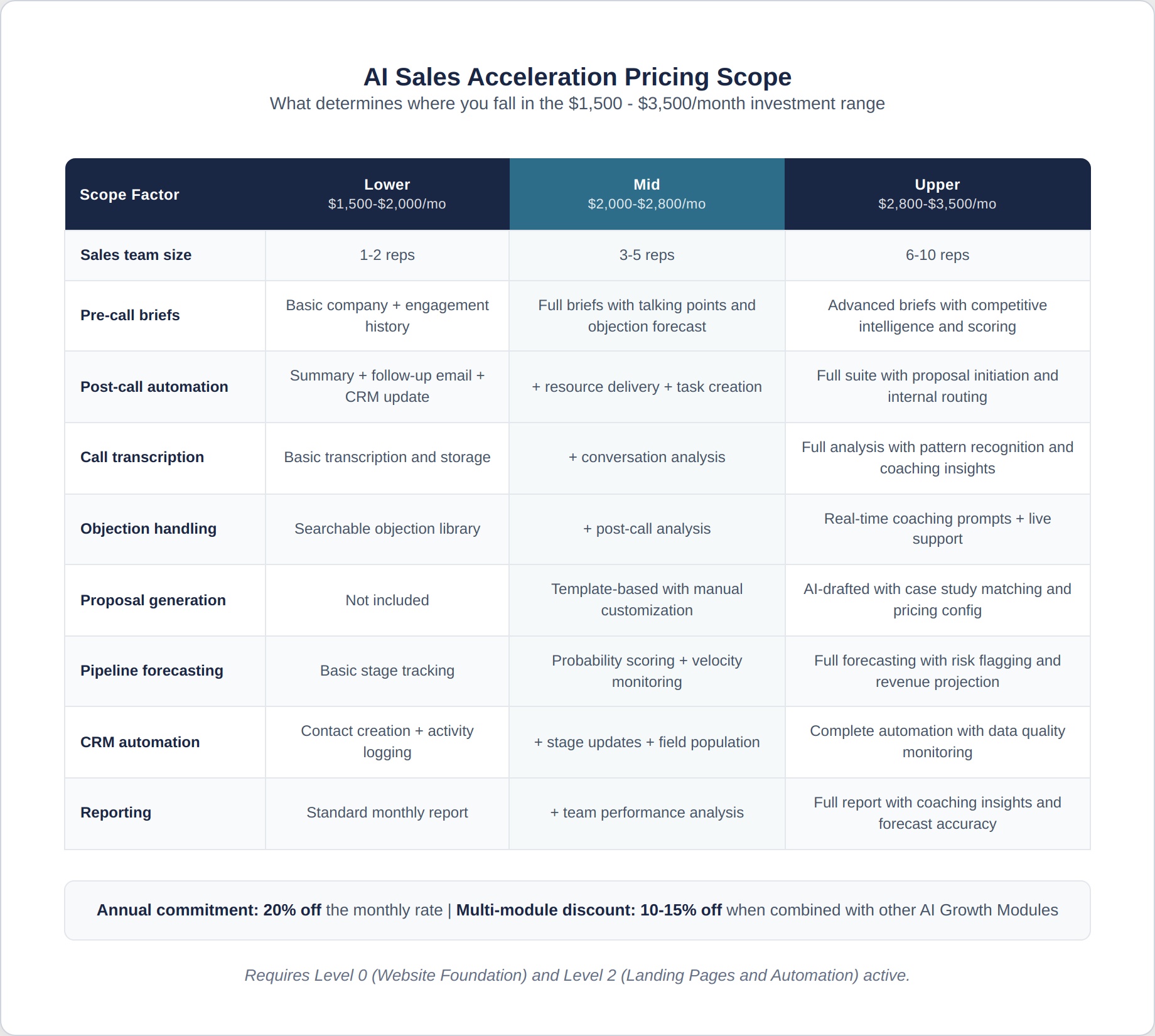
- The investment ranges from $1,500 to $3,500/month, depending on team size, CRM complexity, call volume, and the depth of AI analysis and automation required.
One Sentence Summary: AI Sales Acceleration eliminates the research, admin, follow-up, and data entry that consume your sales team’s time, so every rep spends more hours in conversations and fewer hours preparing for them.
Investment Range: $1,500 – $3,500/month
Annual Commitment: 20% off the monthly rate
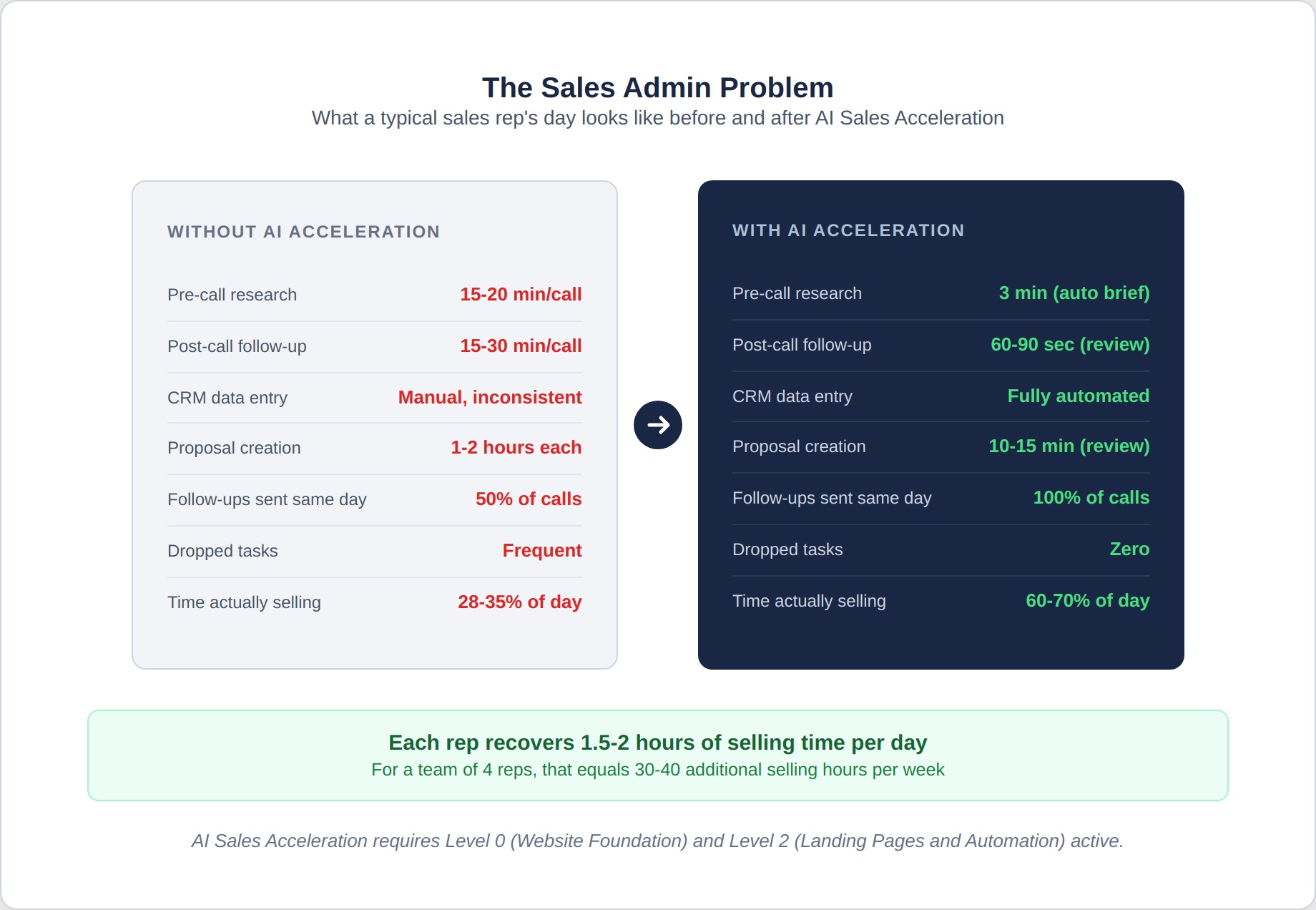
Multi-Module Discount: 10-15% off when combined with other active AI Growth Modules. To use AI Sales Acceleration, you need both Level 0 (Website Foundation) and Level 2 (Landing Pages and Automation) active.
Timeline to first results: Pre-call briefs and CRM automation produce immediate time savings from week one. Call transcription and analysis begin generating insights within 30 days. Pipeline forecasting accuracy reaches reliable levels at 60-90 days.
What This Module Is
Your sales team is good at selling. They’re not good at selling because they spend 60% of their time researching prospects, preparing for calls, writing follow-up emails, updating CRM records, and doing the administrative work that surrounds every conversation.
That’s not a criticism of your team. It’s a structural problem. The administrative burden of selling has grown each year as buyers expect more preparation, personalization, follow-up, and documentation. A rep who spends 3 hours per day actually talking to prospects and 5 hours doing everything else isn’t underperforming. They’re responding rationally to the demands of the role.
AI Sales Acceleration changes this ratio.
It automates the research that happens before every call. It automates the follow-up that happens after every call. It automates the CRM updates that nobody wants to do. It transcribes and analyzes every conversation so patterns become visible. And it forecasts the pipeline, so leadership makes decisions based on data rather than gut feeling.
The result: reps spend far more time in conversations and less on admin, for greater selling capacity with no added headcount.
The Real Cost of Sales Admin
Before looking at what this module includes, consider what sales admin actually costs your business.
Research consistently shows that B2B sales reps spend only 28-35% of their time actually selling. The rest goes to CRM data entry, email writing, call preparation, internal meetings, and administrative tasks.
For a rep earning $80,000 per year, that means $52,000- $58,000 of their compensation goes toward work that doesn’t directly generate revenue. For a team of four reps, that’s $208,000-$232,000 per year spent on activities that AI can handle faster and more consistently.
AI Sales Acceleration doesn’t eliminate all administrative work. But it reduces it enough that each rep gains 1-2 additional hours of selling time per day. For a team of four, that’s 4-8 additional selling hours per day, or the equivalent of hiring 1-2 additional reps at a fraction of the cost.
What You Get
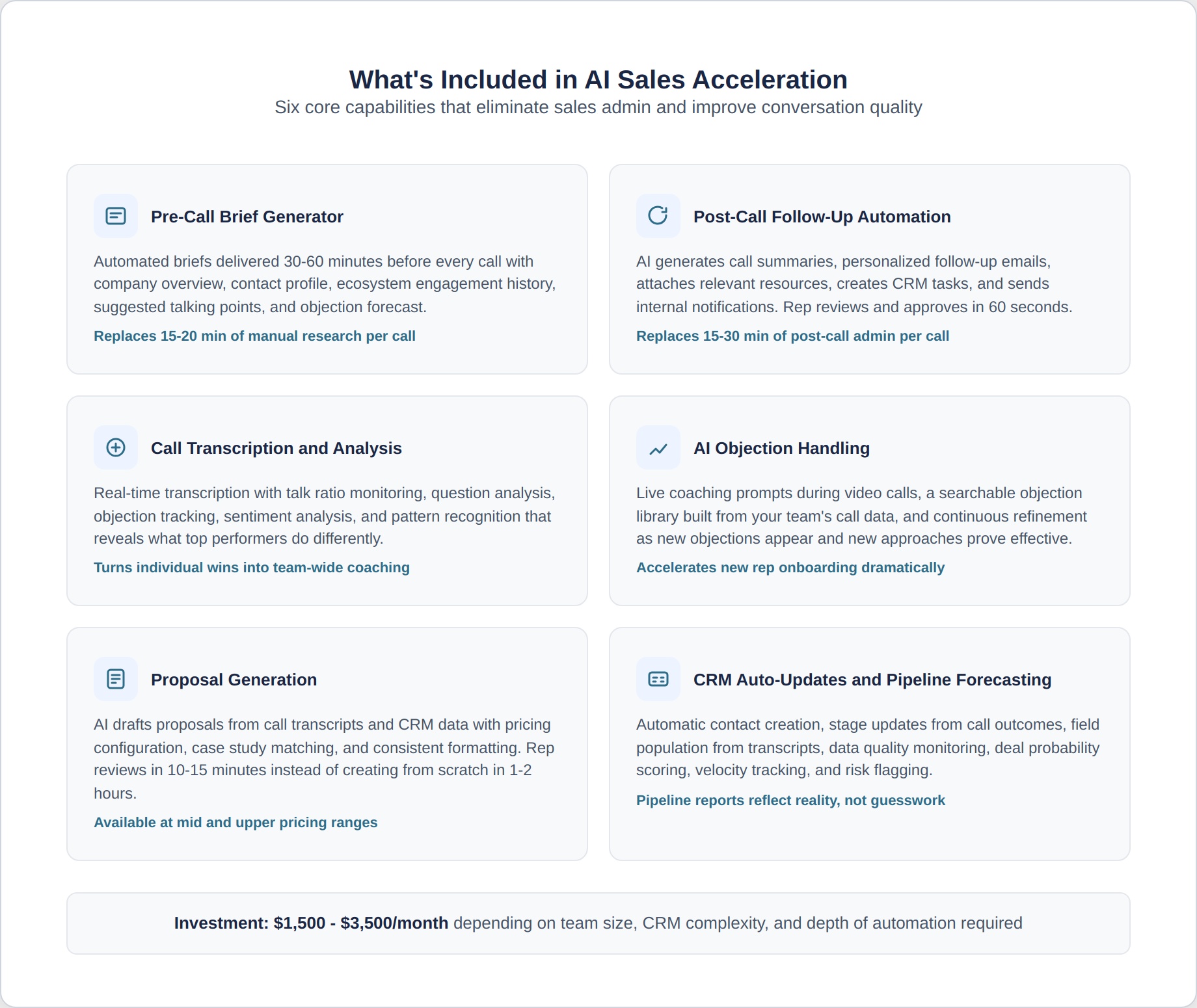
Pre-Call Brief Generator
Most reps skip preparation or spend 15–20 minutes manually researching each prospect. AI eliminates both issues, so every conversation starts on a level playing field.
Before every scheduled call, your rep receives an automated brief containing:
- Company overview: Industry, size, revenue range, location, recent news, and any notable developments
- Contact profile: The prospect’s role, tenure, background, LinkedIn activity, and any content they’ve published or shared
- Ecosystem engagement history: Every touchpoint the prospect has had with your marketing, including pages visited on your Level 0 website, Level 1 social posts they engaged with, Level 2 landing pages they converted on, Level 3 newsletters they opened, Level 4 articles they read, and Level 5 videos they watched
- Lead source and path: How this prospect entered your pipeline and what journey they took before the call was booked
- Scoring data: If Module 2 (AI Lead Intelligence) is active, the prospect’s intent score, buying signals, and predicted readiness level
- Chatbot transcript: If Module 3 (AI Conversion Tools) is active, the full transcript of any chatbot conversation the prospect had, including the questions they asked and answers they received
- Assessment results: If the prospect completed a quiz, calculator, or assessment, their specific scores and answers
- Suggested talking points: Based on the prospect’s engagement pattern, the brief suggests which topics, case studies, and proof points are most likely to resonate
- Objection forecast: Based on the prospect’s company profile and behaviour patterns, the brief flags the objections most likely to arise and suggests how to address them
- Competitor signals: If Module 2 data shows the prospect has been engaging with competitor content or visiting competitor websites, the brief notes this so the rep can address competitive positioning proactively
The brief goes to the rep’s inbox or CRM 30-60 minutes before the call. There is no manual research. The rep reads one page and is more prepared than most competitors.
What this replaces: 15-20 minutes of manual research per call. For a rep taking 4-6 calls per day, that’s 60-120 minutes of preparation time saved each day. Over a month, that’s 20-40 hours of selling time recovered per rep.
Post-Call Follow-Up Automation
What happens after a call matters most. Many reps skip this because they’re rushing to the next call.
After every call, AI Sales Acceleration automatically handles:
- Call summary generation: A structured summary of the conversation, including key topics discussed, objections raised, commitments made, and agreed-upon next steps. The rep reviews and approves the summary in 60 seconds rather than spending 10 minutes writing it.
- Prospect follow-up email: A personalized email sent to the prospect within 2 hours of the call, referencing the specific topics discussed and confirming next steps. The rep reviews and sends with a single click, rather than writing from scratch.
- Resource delivery: If the rep mentioned a case study, article, or resource during the call, AI automatically attaches the relevant materials to the follow-up email so the rep doesn’t have to hunt for links and files.
- Internal notification: If the call advances to a specific stage (proposal requested, decision timeline confirmed, budget discussed), the appropriate internal stakeholders are notified automatically.
- CRM update: The call summary, next steps, stage changes, and follow-up dates are logged in the CRM without the rep ever having to touch it.
- Task creation: If follow-up actions are needed (e.g., send the proposal by Thursday, schedule follow-up in 2 weeks, loop in the technical team), tasks are automatically created in the CRM with appropriate due dates.
What this replaces: 15–30 minutes of post-call admin per conversation. For 4–6 calls daily, that’s 60–180 minutes saved every day.
Call Transcription and Analysis
Every sales conversation contains intelligence that most companies lose the moment the call ends. AI captures and analyzes it all:
Real-time transcription:
- Every call is transcribed accurately in real time with speaker identification.
- Transcripts are searchable, so specific topics, objections, or commitments can be found across hundreds of conversations.
- Transcripts are stored in your CRM, attached to the relevant contact record.
Conversation analysis:
- Talk ratio monitoring: What percentage of the call does the rep talk versus the prospect? Top performers typically maintain a 40/60 or 30/70 ratio. Reps who talk too much get coached.
- Question analysis: How many questions does the rep ask? Are they open-ended or closed? Do they lead to deeper conversation or dead ends?
- Objection tracking: Which objections appear most frequently across all calls? Are they being handled effectively? Which reps handle specific objections best?
- Commitment tracking: When next steps are discussed, does the rep secure a specific commitment (date, time, deliverable) or leave things vague?
- Sentiment analysis: Does the prospect’s tone and engagement increase or decrease over the course of the call? Where do the high points and low points occur?
- Keyword and topic tracking: Which topics come up most frequently? Which topics correlate with deals that close versus deals that stall?
Pattern recognition across your team:
- What do your best reps do differently? AI identifies the specific behaviours, questions, speaking patterns, and techniques that set your top closer apart from your average performer. Those patterns become coachable insights for the rest of the team.
- What kills deals? AI identifies the specific conversation moments, topics, or rep behaviours that correlate with deals stalling or losing. These become coaching priorities.
- How do conversations with closed-won deals differ from closed-lost? The analysis reveals whether winning deals involve more discovery time, different objection handling, specific trust-building moments, or other distinguishable patterns.
How call intelligence feeds the ecosystem:
- Common questions and objections from calls become Level 4 article topics and Level 5 video subjects.
- Prospect language and phrasing from transcripts improve Level 1 social content, Module 1 outreach messaging, and Level 2 landing page copy.
- Sales team insights about what resonates inform content strategy across all levels
AI Objection Handling Suggestions
When objections arise during live calls, AI provides real-time support:
- Live coaching prompts are displayed on the rep’s screen during the call when the AI detects an objection. The prompt suggests a response approach based on what has worked best in similar conversations historically.
- An objection library built from your team’s accumulated call data shows every objection encountered, the frequency of each, and the response approaches that produce the best outcomes.
- New rep onboarding acceleration: New team members have immediate access to the collective wisdom on handling objections from your entire team’s history, rather than learning through trial and error over months.
- Continuous refinement: As new objections appear and new response approaches prove effective, the library updates automatically.
Important note on live coaching: Real-time suggestions are available during video calls where the rep’s screen is visible. For phone calls, the objection library and response recommendations are available in the pre-call brief and as a searchable reference tool. The AI doesn’t interrupt the conversation. It provides support that the rep can use at their discretion.
Proposal Generation
Proposals are time-consuming to create and often inconsistent across reps. AI standardizes quality while eliminating production time:
- Template-based generation where AI pulls the prospect’s specific situation, needs, and discussed scope from the call transcript and CRM data to populate a proposal customized to their exact requirements
- Pricing configuration based on the scope discussed during the call, with appropriate tier recommendations and discount structures applied automatically
- Case study matching, selecting, and inserting the most relevant case studies based on the prospect’s industry, company size, and specific challenges.
- Rep review and approval before sending. AI drafts the proposal. The rep reviews, adjusts, and approves in 10-15 minutes rather than creating from scratch in 1-2 hours.
- Consistent quality: Every proposal follows the same professional structure and messaging regardless of which rep produces it.
- Version tracking: Proposal versions are tracked so the team knows which version the prospect received and what changed between revisions.
CRM Auto-Updates
CRM data entry is the most universally hated task in sales. It’s also the most neglected, which means pipeline data is perpetually inaccurate.
AI Sales Acceleration keeps your CRM current without rep effort:
- Automatic contact creation and enrichment when new prospects enter the pipeline through any channel
- Stage updates based on call outcomes, email responses, and prospect behaviour rather than manual rep logging
- Activity logging records every call, email, meeting, and touchpoint without the rep having to click “log activity.”
- Field population from call transcripts: when a prospect mentions their budget, timeline, team size, or decision process during a call, AI extracts that information and populates the appropriate CRM fields
- Data quality monitoring flags records with missing information, outdated stages, or inconsistent data to ensure pipeline reports are reliable.
What this means for leadership: Pipeline reports reflect reality rather than what reps actually logged. Forecasting becomes more accurate because the data on which it is built is more complete.
Pipeline Forecasting
Move from gut-feeling predictions to data-driven forecasts:
- Deal probability scoring based on behavioural signals, engagement patterns, conversation analysis, and comparison with historical patterns from deals that closed versus deals that stalled
- Stage-appropriate forecasting weighting deals differently based on how far they’ve progressed and what specific milestones have been reached (not just which stage they’re in, but what evidence supports that stage assignment)
- Velocity tracking, monitoring how fast deals move through each stage, and flagging deals that are moving slower than historical norms for similar opportunities
- Risk flagging identifies deals that exhibit warning signs: declining prospect engagement, missed follow-up commitments, extended silence, or patterns that match those of historically lost deals.
- Revenue projection forecasting expected close dates and revenue based on current pipeline data, stage probabilities, and historical conversion rates.
- Accuracy tracking: Forecast accuracy is measured monthly against actual outcomes, and the model is continuously recalibrated to improve prediction quality.
What the Sales Team Actually Experiences
Here’s what a typical day looks like with AI Sales Acceleration versus without it:
Without AI Sales Acceleration
8:00 AM: Rep arrives and checks calendar. Four calls are scheduled today. Starts researching the first prospect. Opens LinkedIn, CRM, website. Spends 20 minutes piecing together context.
8:30 AM: First call. Good conversation, but the rep missed that the prospect had watched a Level 5 video about a specific topic last week. The conversation covers ground the prospect already understands.
9:15 AM: Call ends. Rep spends 15 minutes writing a follow-up email, then 10 minutes updating the CRM. They meant to attach a case study, but can’t find the right one. They’ll do it later. They forget.
9:40 AM: Starts researching the second prospect. Another 20 minutes.
10:00 AM: Second call. During the call, the prospect raises an objection that the rep hasn’t encountered before. The rep fumbles through a response.
10:45 AM: Call ends. The CRM update is being pushed to later because the next call is in 15 minutes, and the rep hasn’t researched that prospect yet.
By 5:00 PM: Four calls completed. Follow-up emails were sent for two of them (the other two got pushed to tomorrow). CRM is partially updated. No proposal started. The case study still hasn’t been sent.
With AI Sales Acceleration
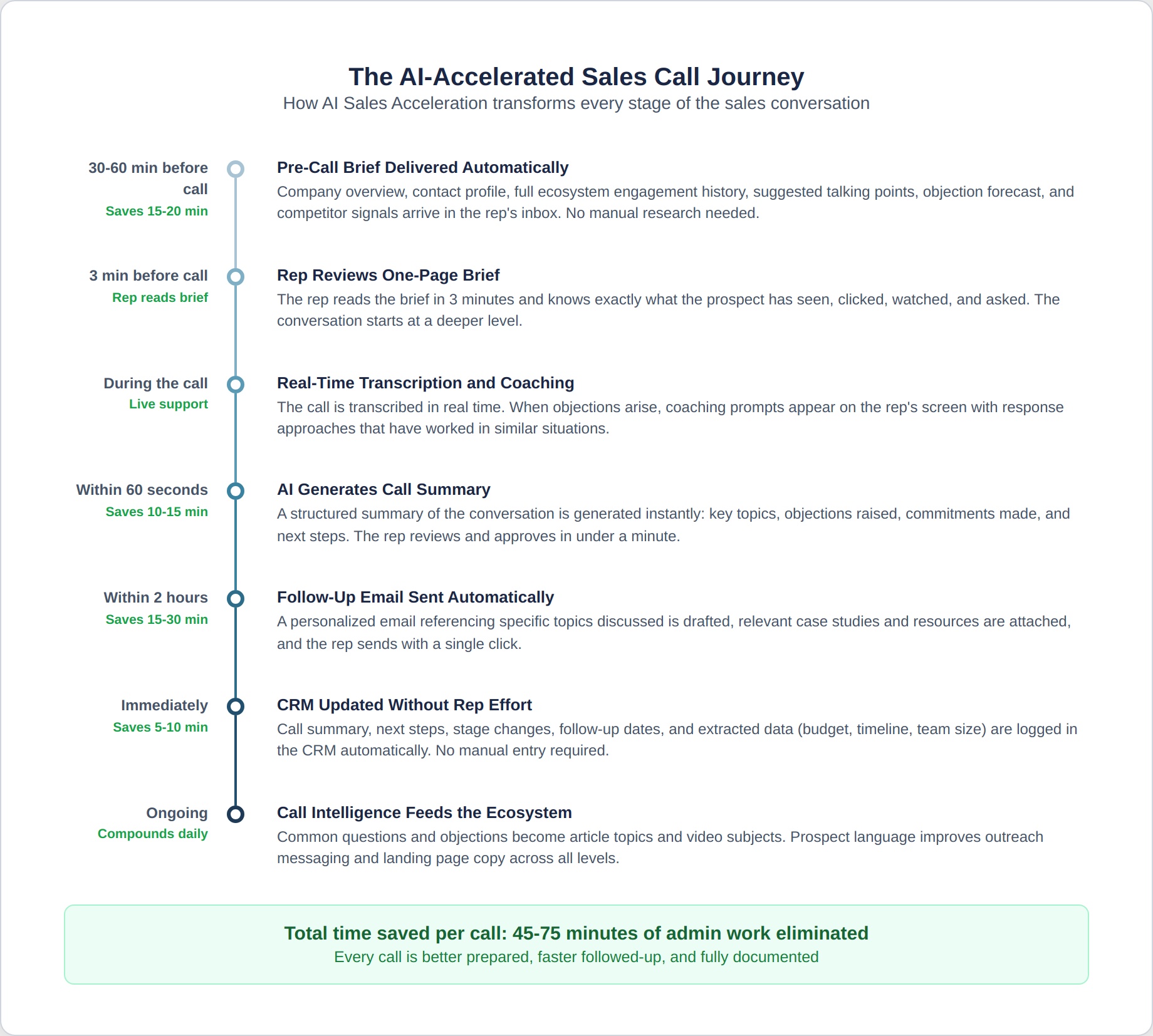
8:00 AM: Rep arrives and checks the pre-call briefs already in their inbox. Four briefs, each one page, covering everything they need to know, including ecosystem engagement history, suggested talking points, and likely objections.
8:15 AM: Rep reads the first brief in 3 minutes. The brief notes that the prospect watched a Level 5 video about lead generation systems last week, and their intent score spiked yesterday.
8:30 AM: First call. Rep references the video: “I saw you were looking at our lead generation framework. What specifically caught your attention?” The conversation starts at a deeper level because the rep knows what the prospect has already absorbed.
9:15 AM: Call ends. Within 60 seconds, the rep reviews the AI-generated summary and follow-up email on their screen. They approve both with minor edits. The relevant case study is already attached because AI matched it to the conversation topics. CRM is updated automatically. Total post-call time: 2 minutes.
9:17 AM: Rep reads the second pre-call brief. 3 minutes.
9:20 AM: Second call. Prospect raises an unfamiliar objection. A coaching prompt appears on the rep’s screen, suggesting a response approach based on how top performers have handled similar objections. The rep uses the framework and navigates the objection effectively.
10:00 AM: Call ends. AI summary and follow-up approved in 90 seconds. CRM updated automatically.
By 5:00 PM: Four calls completed with full preparation. All follow-ups are sent within 2 hours. CRM is completely current. One proposal has been drafted and is ready for review. The rep had time for two additional prospecting conversations because they recovered 2+ hours from eliminated admin work.
The difference: Same four calls. Dramatically better preparation. Consistently faster follow-up. Complete CRM data. Recovered time for additional selling activity. No dropped balls.
How AI Sales Acceleration Connects to the Ecosystem
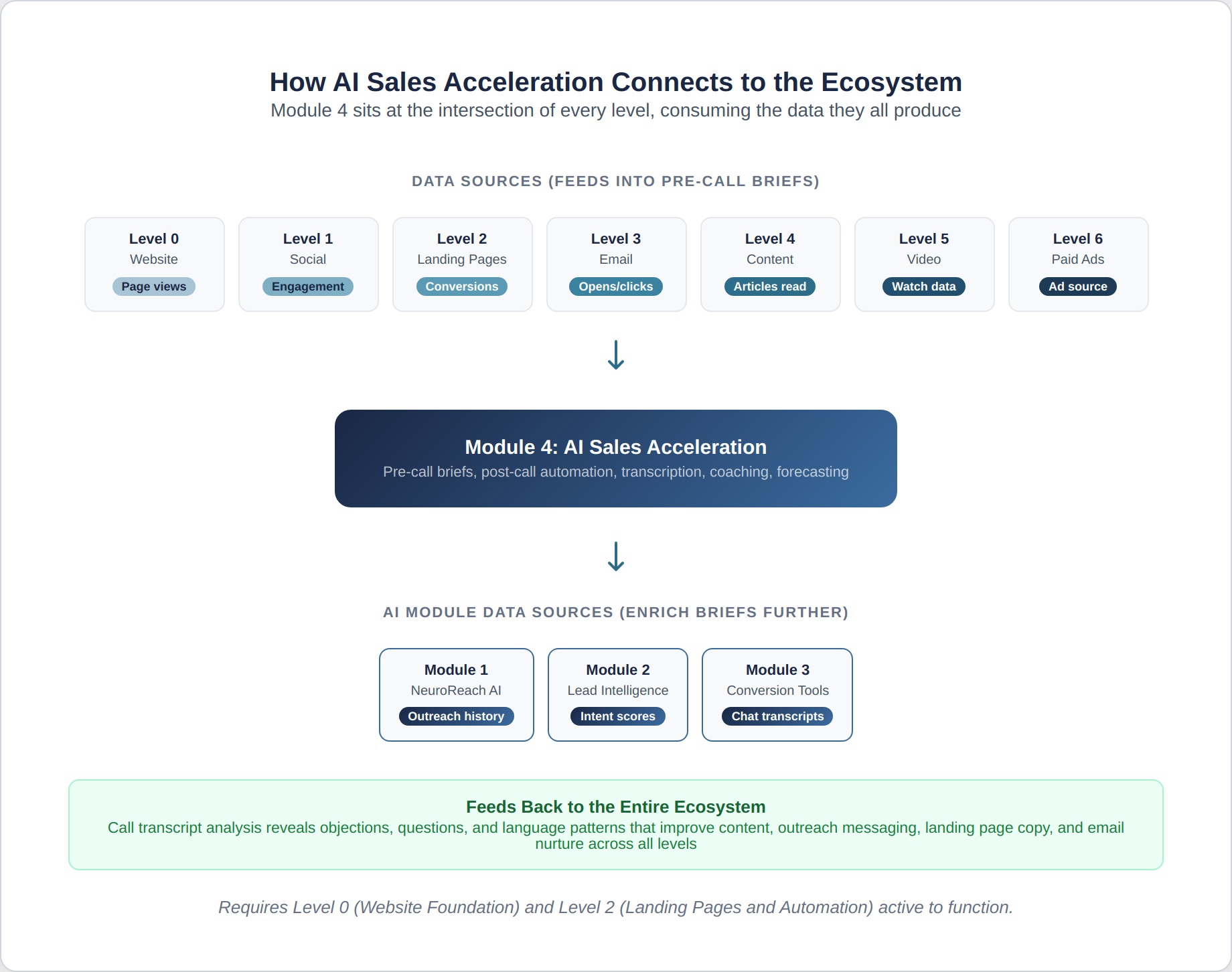
This module sits at the intersection of every level because it processes the data they all produce:
Consumes data from Level 0 (Website): Prospect page views and engagement patterns inform pre-call briefs.
Consumes data from Level 1 (Social): Prospect social engagement feeds into the engagement history section of pre-call briefs.
Consumes data from Level 2 (Landing Pages): Form submissions, landing page visits, and automation sequence behaviour are all included in the pre-call context.
Consumes data from Level 3 (Email): Newsletter opens, clicks, and replies are tracked and surfaced before calls.
Consumes data from Level 4 (Content): Which articles the prospect read, how long they spent, and what topics they gravitated toward, to inform talking point suggestions.
Consumes data from Level 5 (Video): which videos the prospect watched, how much they watched, and which topics they engaged with, to deepen pre-call intelligence.
Consumes data from Level 6 (Paid Ads): Whether the prospect entered through an ad campaign and which messaging resonated is included in the brief.
Consumes data from Module 1 (NeuroReach AI): If the prospect was initially contacted through outreach, the full outreach history and response context are in the brief.
Consumes data from Module 2 (AI Lead Intelligence): Intent scores, buying committee data, and competitive signals enrich every pre-call brief.
Consumes data from Module 3 (AI Conversion Tools): Chatbot transcripts and assessment results are included, so the rep knows what the prospect already asked and answered.
Feeds back to the ecosystem: Call transcript analysis reveals objections, questions, and language patterns that improve content, outreach messaging, landing page copy, and email nurture across all levels.
What Determines Where You Fall in the Price Range
How Long Before You See Results
Week 1: Pre-call briefs and CRM auto-updates go live. Reps immediately experience reduced preparation time and eliminated data entry. The time savings are felt from day one.
Week 2-4: Post-call automation is configured and active. Follow-up emails, summaries, and task creation happen automatically. Call transcription begins capturing conversation data.
Month 1: The first month of call data is analyzed. Initial patterns emerge showing which topics, questions, and approaches correlate with positive outcomes. Pipeline forecasting begins with initial calibration. Reps have recovered measurable selling time.
Month 2: Call analysis identifies specific coaching opportunities for individual reps. The objection library is populated with real data from your team’s conversations. Proposal generation (if included) is active and producing drafts. Forecast accuracy is being measured against actual outcomes.
Month 3: The system is fully operational. Pre-call briefs pull from 3 months of ecosystem engagement data. Call analysis has enough data to identify statistically meaningful patterns. Pipeline forecasting reaches reliable accuracy. The team has developed a rhythm in which AI handles admin tasks, and they focus on conversations.
Months 4-6: Compounding intelligence. The more calls analyzed, the smarter the system becomes. Coaching insights get more specific. Forecast accuracy improves. The objection library covers nearly every scenario. New reps onboard faster because the system provides the institutional knowledge immediately.
Month 6+: AI Sales Acceleration is a structural advantage. Your team operates with more preparation, faster follow-up, and better intelligence than competitors who still rely on manual processes. Pipeline data is accurate enough for confident decision-making. The time savings have accumulated into a significant increase in selling capacity without adding headcount.
Why This Investment Makes Sense
The math is straightforward.
If AI Sales Acceleration saves each rep 1.5-2 hours per day on research, follow-up, and CRM work, that’s 7.5-10 additional selling hours per week per rep. For a team of four reps, that’s 30-40 additional selling hours per week.
If each additional selling hour yields 1 additional meaningful conversation per week and your close rate is 20%, those conversations yield 1-2 additional closed deals per month across the team. At an average deal value of $15,000, that’s $15,000- $30,000 in additional monthly revenue from time previously spent on admin.
The module investment of $1,500-$3,500 per month produces a return multiple within the first month for most teams.
Beyond the time savings, the quality improvements compound: better-prepared reps have better conversations. Better conversations produce higher close rates. Higher close rates from the same lead volume mean more revenue without more marketing spend. The improvement touches every deal, not just the additional conversations the recovered time creates.
What This Module Solves
AI Sales Acceleration solves the problem of sales capacity without headcount. Most B2B companies reach a point where their sales team is maxed out on time, not skill. The reps are good at closing. They just don’t have enough hours for conversations because the admin consumes most of their day. This module eliminates the admin bottleneck, improves conversation quality through better preparation, ensures consistent follow-up, and provides the data infrastructure for accurate forecasting, all without adding a single person to the team.
What This Module Does NOT Include
- Outbound outreach to new prospects (Module 1: NeuroReach AI)
- Anonymous visitor identification or intent tracking (Module 2: AI Lead Intelligence)
- Website chatbots or interactive tools (Module 3: AI Conversion Tools)
- Content production or repurposing (Module 5: AI Content Engine)
- Email nurture optimization (Module 6: AI Nurture and Retention)
- Lead generation or marketing execution (ecosystem levels)
AI Sales Acceleration makes your sales team faster and better prepared. Other modules and levels generate leads and build the trust that drives the conversations your team has.
What You Need to Provide
- Onboarding conversation (60-90 minutes): We map your sales process, CRM structure, team workflow, call handling, and follow-up practices
- CRM access: Admin or integration access to configure automation, field mapping, and activity logging
- Call platform access: Integration with your phone system, Zoom, Google Meet, or whatever platform your team uses for calls
- Sales team briefing (30-45 minutes): Walk through how pre-call briefs arrive, how post-call automation works, and how the system integrates with their daily routine
- Team adoption support (first 2 weeks): We work closely with the team during the initial rollout to ensure adoption and address workflow questions
- Monthly report review (30 minutes): Review performance data, coaching insights, and forecast accuracy
- Ongoing feedback: Reps flag when briefs miss context or follow-up emails need tone adjustments, so the system improves continuously
Total monthly time commitment: approximately 2-3 hours after initial onboarding, with the largest investment in the first 2 weeks during rollout.
Who Manages This
Rod Agatep personally oversees the sales acceleration strategy, workflow design, and the interpretation of coaching insights for every Module 4 engagement. With 27 years of experience in B2B marketing and sales enablement, Rod ensures every automation enhances the sales process rather than disrupting it.
Every configuration is designed under Rod’s direct supervision to fit your team’s specific workflow, CRM structure, and selling style. This is not a generic tool deployment. It is a custom-configured system built around how your team actually works.
AI Sales Acceleration Readiness Assessment
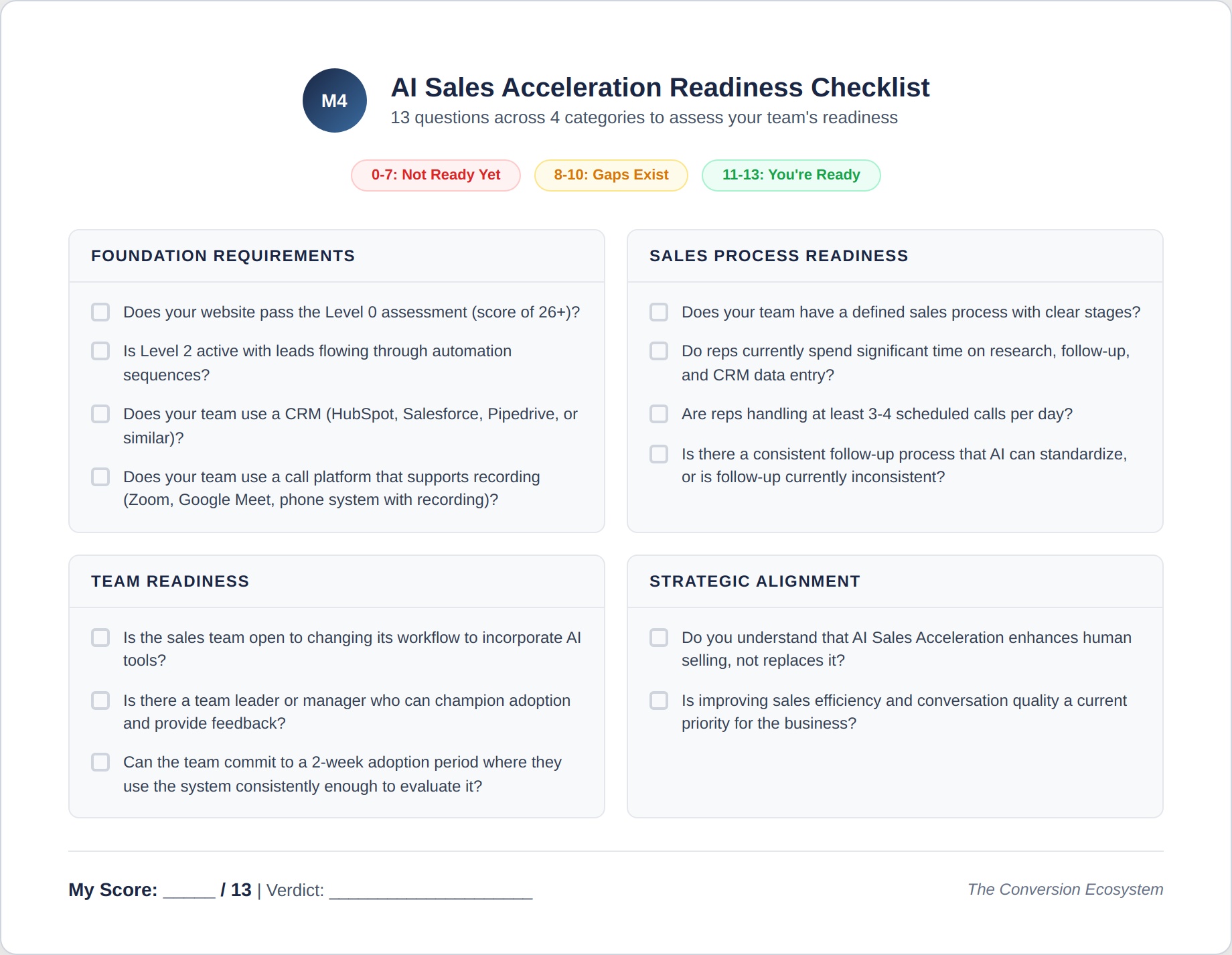
Scoring
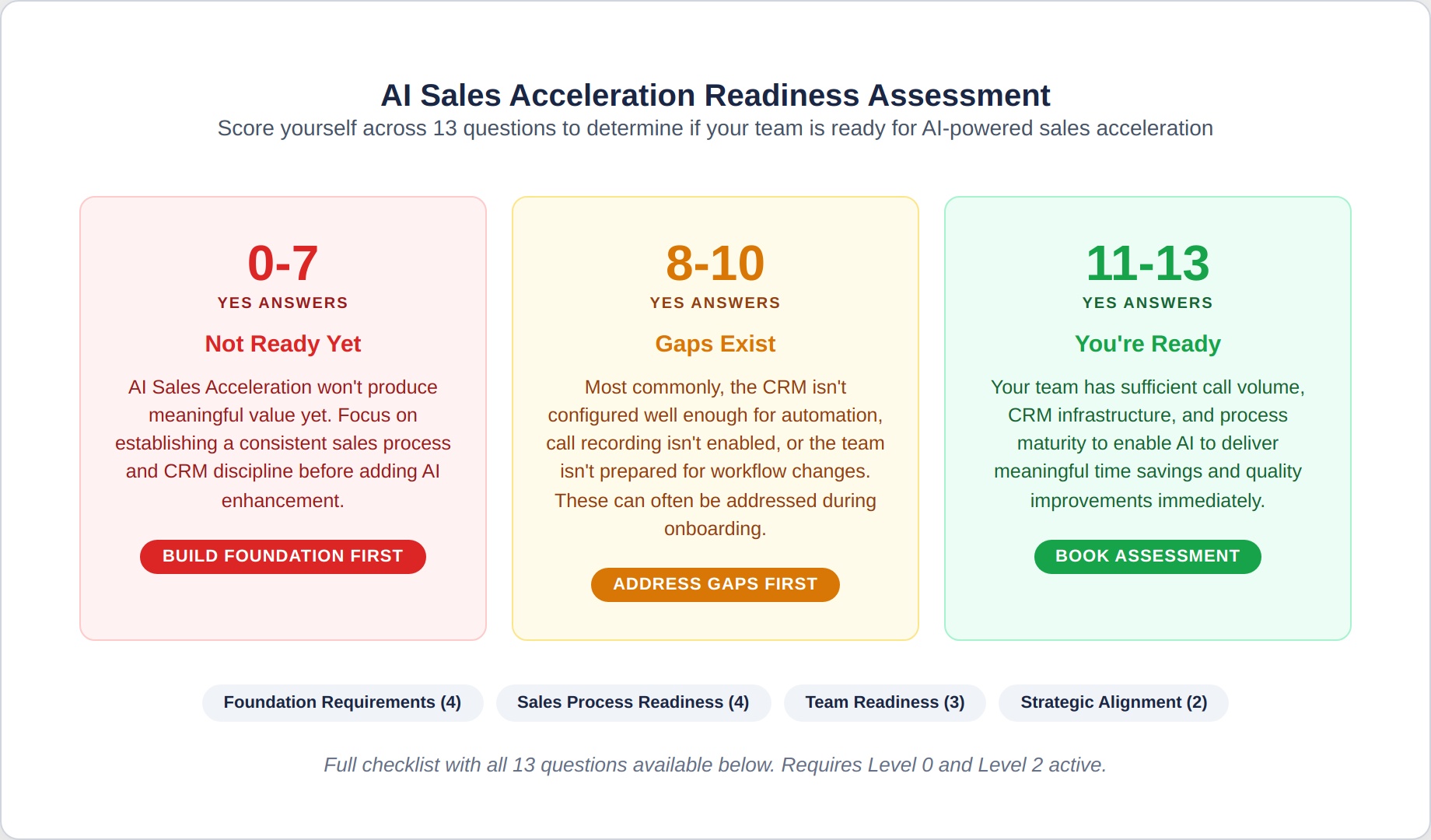
11-13 YES answers: You’re ready. Your team has sufficient call volume, CRM infrastructure, and process maturity to enable AI to deliver meaningful time savings and quality improvements.
8-10 YES answers: Gaps exist. Most commonly, the CRM isn’t configured well enough for automation, call recording isn’t enabled, or the team isn’t prepared for workflow changes. These can often be addressed during onboarding.
7 or fewer YES answers: AI Sales Acceleration won’t produce meaningful value yet. Focus on establishing a consistent sales process and CRM discipline before adding AI enhancement.
Pricing Summary
| Option | Investment |
|---|---|
| AI Sales Acceleration monthly | $1,500 – $3,500/month |
| Annual commitment | 20% off monthly rate |
| Combined with other AI Growth Modules | 10-15% multi-module discount |
What’s included: Pre-call brief generation, post-call follow-up automation, call transcription and analysis, conversation pattern recognition, objection handling support, proposal generation (mid and upper ranges), CRM auto-updates and data quality monitoring, pipeline forecasting with risk flagging (mid and upper ranges), team adoption support, monthly performance reporting with coaching insights, and quarterly strategy reviews.
What’s not included: Outbound outreach (Module 1), visitor identification (Module 2), website chatbots (Module 3), content production (Module 5), email nurture optimization (Module 6), marketing execution (ecosystem levels), or CRM platform costs.
Next Step
If you’re not sure whether AI Sales Acceleration is the right module, whether your team’s workflow supports it, or whether your CRM infrastructure is ready, the fastest way to find out is a conversation.
We’ll review your sales process, assess your CRM setup, evaluate your team’s current time allocation, and tell you honestly whether AI acceleration will produce meaningful results for your specific situation.
No pitch. No pressure. Just clarity on where you stand and what to do next.
Frequently Asked Questions
Will my reps actually use this?
Adoption is the biggest risk with any sales tool, and we address it directly. The system is designed to make reps’ lives easier, not harder. Pre-call briefs arrive in their inbox without any action required. Post-call automation saves them 15-30 minutes per call. CRM updates happen without them touching the CRM. Within 2 weeks, most reps experience enough time savings that they resist going back to the old way. We include a 2-week hands-on adoption support period to ensure a smooth transition for the team.
Does this work with my CRM?
We integrate with HubSpot, Salesforce, Pipedrive, and most major CRM platforms. If you use a less common CRM, we assess integration capability during onboarding. The module requires CRM access to function because the pre-call briefs, post-call updates, and pipeline forecasting all depend on CRM data.
Can reps edit what the AI generates?
Yes, always. Pre-call briefs are informational, and the rep decides how to use them. Follow-up emails are drafted by AI, reviewed, and approved by the rep before sending. Proposals are generated as drafts for rep review and customization. The rep maintains full control over what goes out. AI does the production work. The rep does the quality control.
Is call recording required?
Call transcription and analysis require recording. Pre-call briefs, post-call follow-up automation, CRM updates, and pipeline forecasting do not. If your team or prospects are uncomfortable with recording, the module can be configured without the transcription component while still providing significant value through the other capabilities.
How does this handle sensitive information from calls?
Call transcripts and analysis are stored in your CRM and accessible only to authorized team members. We follow data handling practices aligned with your company’s privacy policies. Transcripts can be configured to exclude specific sections or redact sensitive information. All data belongs to you and is managed in accordance with your data governance requirements.
What if we only have one or two sales reps?
The module works for teams of any size, but the value calculation changes. For 1-2 reps, the time savings per person are the same, but the total organizational impact is smaller. The lower price range ($1,500-$2,000/mo) is designed for small teams. If your 1-2 reps are handling significant call volume and the administrative burden is clearly limiting their selling capacity, the module produces a strong ROI even for small teams.
How does this work with Module 1 (NeuroReach AI)?
They complement each other naturally. NeuroReach AI generates meetings with qualified prospects. AI Sales Acceleration prepares your reps for those meetings with full context on the outreach that generated the response, the prospect’s ecosystem engagement, and suggested talking points. The handoff from outreach to sales conversation is seamless and fully informed. Activating both qualifies for a multi-module discount.
What are the cancellation terms?
Month-to-month with 30 days’ notice. Annual at 20% off with a 12-month term. The early termination fee equals the discount on the completed months. You retain all CRM configurations, automation workflows, call transcripts, objection libraries, proposal templates, and pipeline models. Everything built during the engagement remains operational in your CRM.
Do I own everything?
Yes. Every configuration, every automation, every transcript, every coaching insight, every proposal template, and every CRM workflow belongs to you. If the engagement ends, the system continues operating within your CRM. There are no tool-removal clauses or data-expiration terms.